What's Webflow? AI Site Builder, MCP and Agents in 2026
The quick answer to "what's Webflow" is that it's a visual platform for designing and hosting websites. It writes the code (HTML, CSS and JavaScript) as you work. In 2026 it also drafts sites from a prompt and lets AI assistants like Claude and ChatGPT work on your site, so Webflow now calls itself an agentic web platform.
Webflow says more than 300,000 companies use it, and its AI features changed fast this year. I wrote this for founders and marketers weighing Webflow for their site.
Key takeaways
In this guide
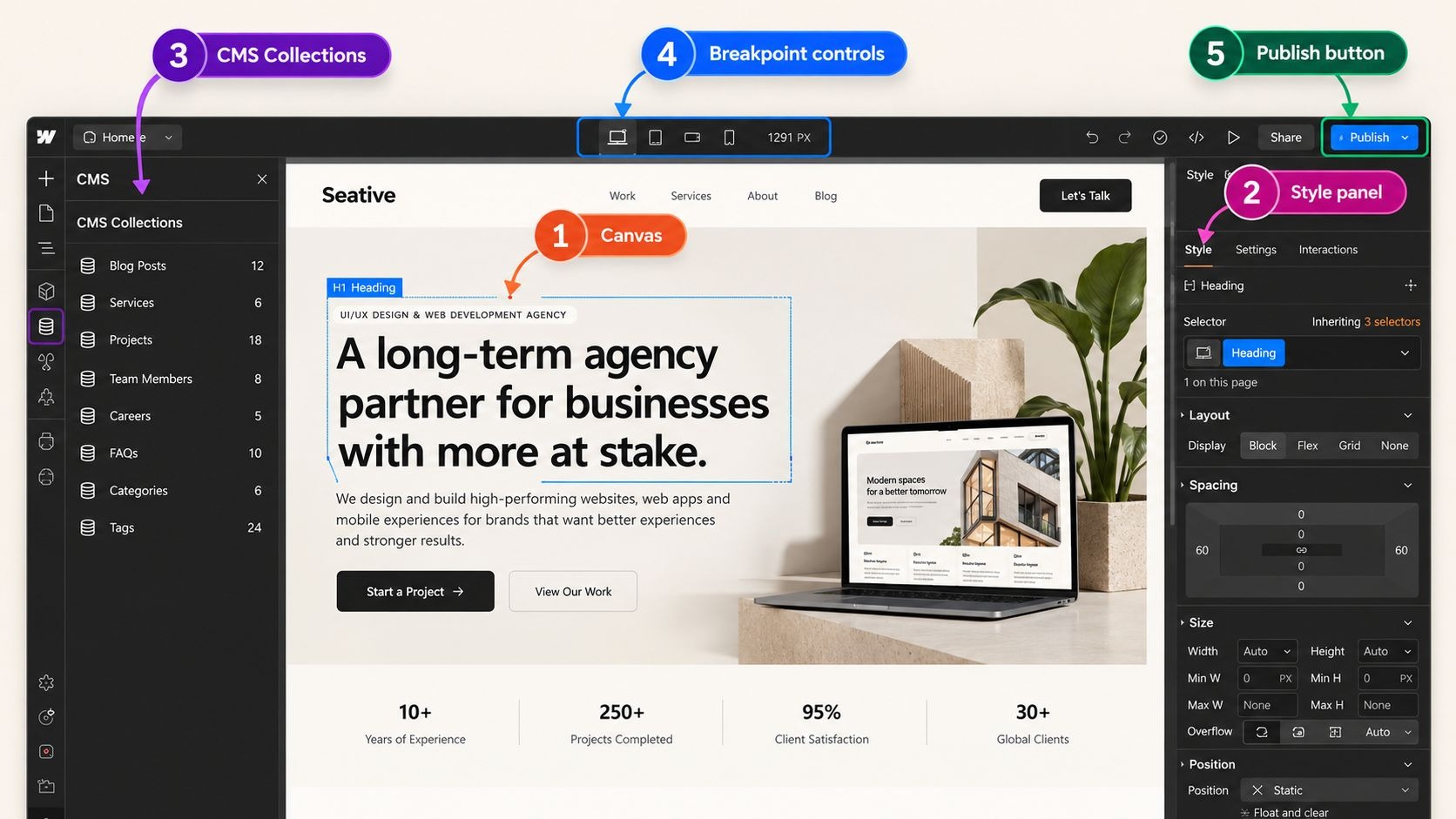
You design pages on a visual canvas called the Webflow Designer, and Webflow turns every box and style into HTML and CSS. Your blog posts and other repeating content live in the Webflow CMS. When you publish, Webflow hosts the site, so there's no server to rent or plugins to update.
Of those three parts, the Designer takes the most getting used to. You know how a word processor turns a click on Bold into hidden formatting code? The Designer does the same for web pages, writing code as you drag and style each section.
That comparison only goes so far, though. Web layouts follow rules about how boxes stack and stretch, called the CSS box model, so Webflow takes longer to learn than simple drag-and-drop builders.
I know that's a lot of names, so here's how the parts fit together:
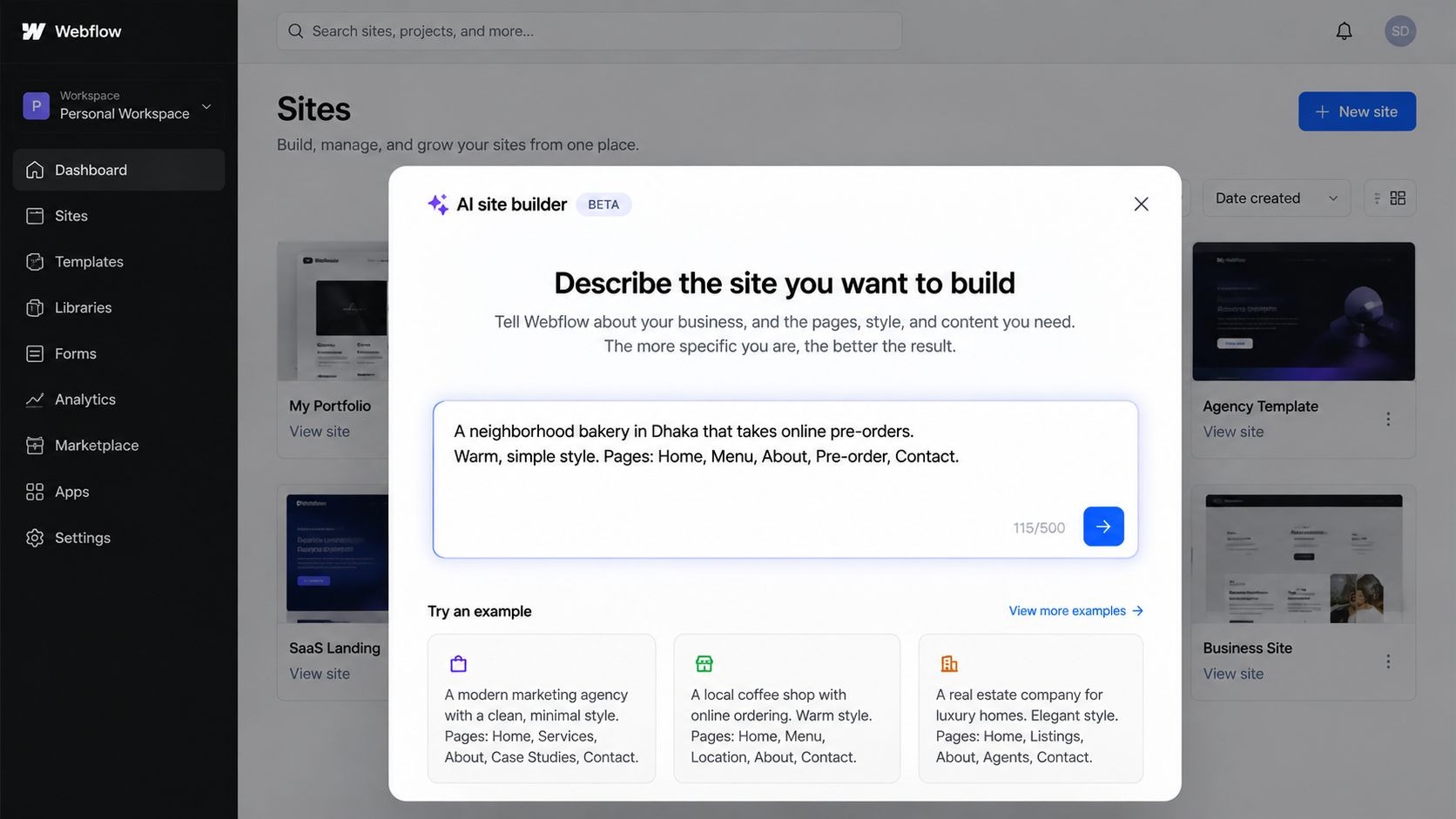
Webflow's AI site builder turns a written prompt into an editable site of up to five pages, with animations and a starter design system (saved colors, fonts and spacing). Since Webflow's February 2026 update, every Webflow customer can use it from the New Site button.
The builder doesn't even use AI credits, Webflow's allowance for its other AI features, and what you get is a normal Webflow site that you keep shaping in the Designer. Think about buying a shirt off the rack. It looks right on the hanger, but the fit still needs adjusting before it feels like yours. The AI site builder gives you that off-the-rack site, though it only knows the size you described, so a vague prompt gets you a generic site.
You might be thinking you can skip hiring a designer now. For a quick test page, maybe, but a prompt can't know your customers' doubts or the proof that answers them. That's why, at Seative Digital, we use AI to speed up research, exploration and repetitive tasks. An experienced designer then refines every output.
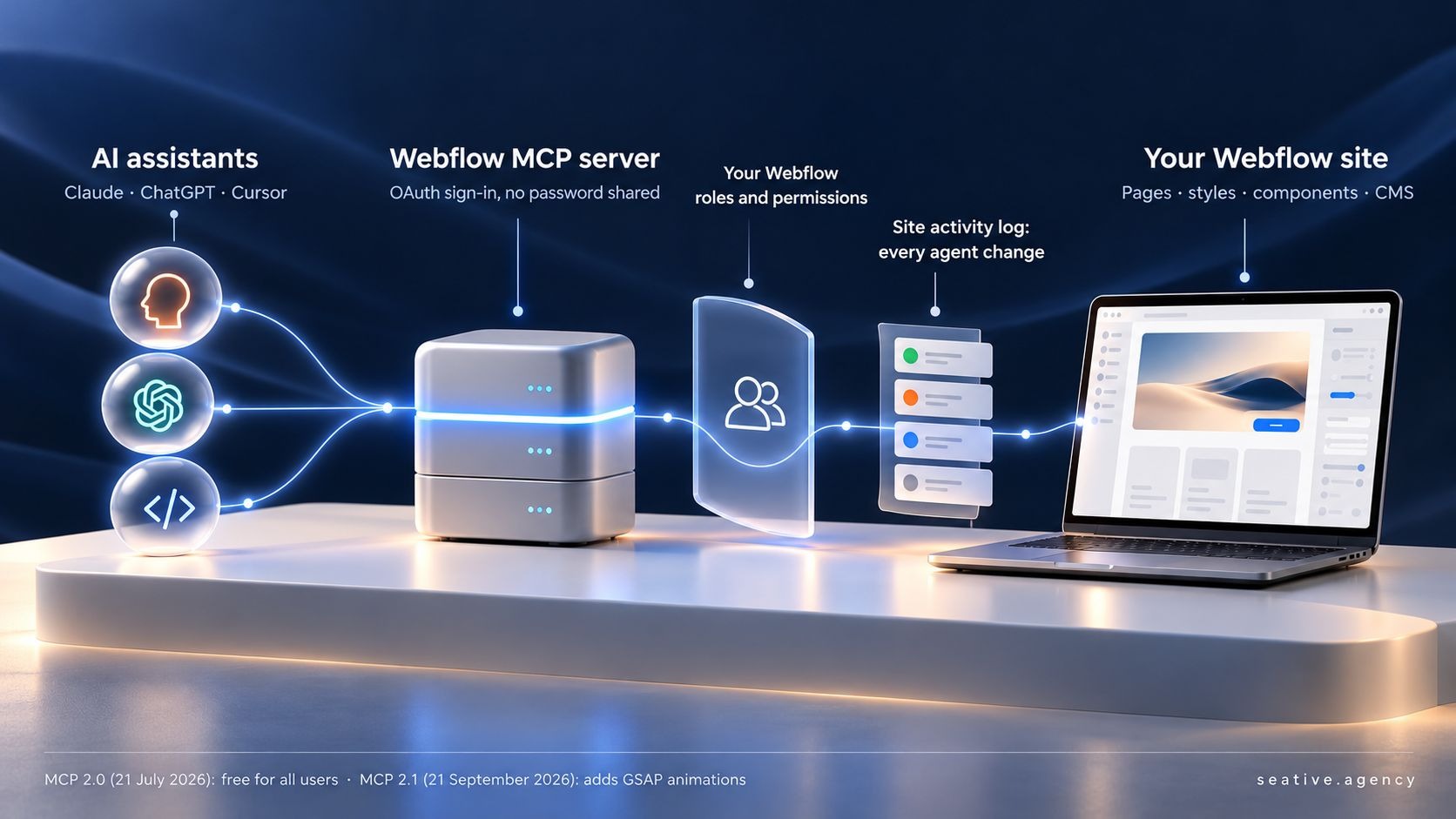
Webflow MCP is Webflow's server for the Model Context Protocol (MCP), an open standard that lets AI assistants connect to other software. Once connected, assistants like Claude, ChatGPT or Cursor can edit your pages, styles, components (reusable blocks like a header) and CMS content, within the limits of your Webflow role.
The AI site builder helps on day one, but MCP helps every week after that, so I think it's the bigger news for most businesses. It only works with the right limits, though.
Think about the key card a new colleague gets: it opens the floors they need, and the front desk logs every swipe. Webflow's MCP docs describe the same setup: assistants sign in through OAuth, so they never see your password, and every change they make lands in the site's activity log. Unlike a key card, though, an agent can edit things, so someone still checks its work.
Those checks matter more since Webflow's MCP 2.0 release on July 21, 2026. It's free for all users and gives assistants your design system, CMS data and site analytics. MCP 2.1 followed on September 21 with GSAP animations, the engine behind Webflow's interactions.
Stick with me here, because the practical side changes your week. Webflow's guide to its Claude connector shows Claude checking SEO titles across every page and adding a reading-time field to every blog post. Its author says "AI won't replace the Designer," but adds that tedious, repetitive jobs like these go faster with Claude.
Webflow now calls itself "the agentic web platform for modern businesses," meaning a platform where people and AI agents work on the same website. An AI agent is an assistant that takes actions, like editing a page, instead of only answering questions.
MCP lets outside agents in, and Webflow is now building its own agents into the platform too. At Webflow Conf 2026 on September 2, the company announced Source by Webflow, a workspace where marketers and agents build on the site's code together, now in a limited research preview.
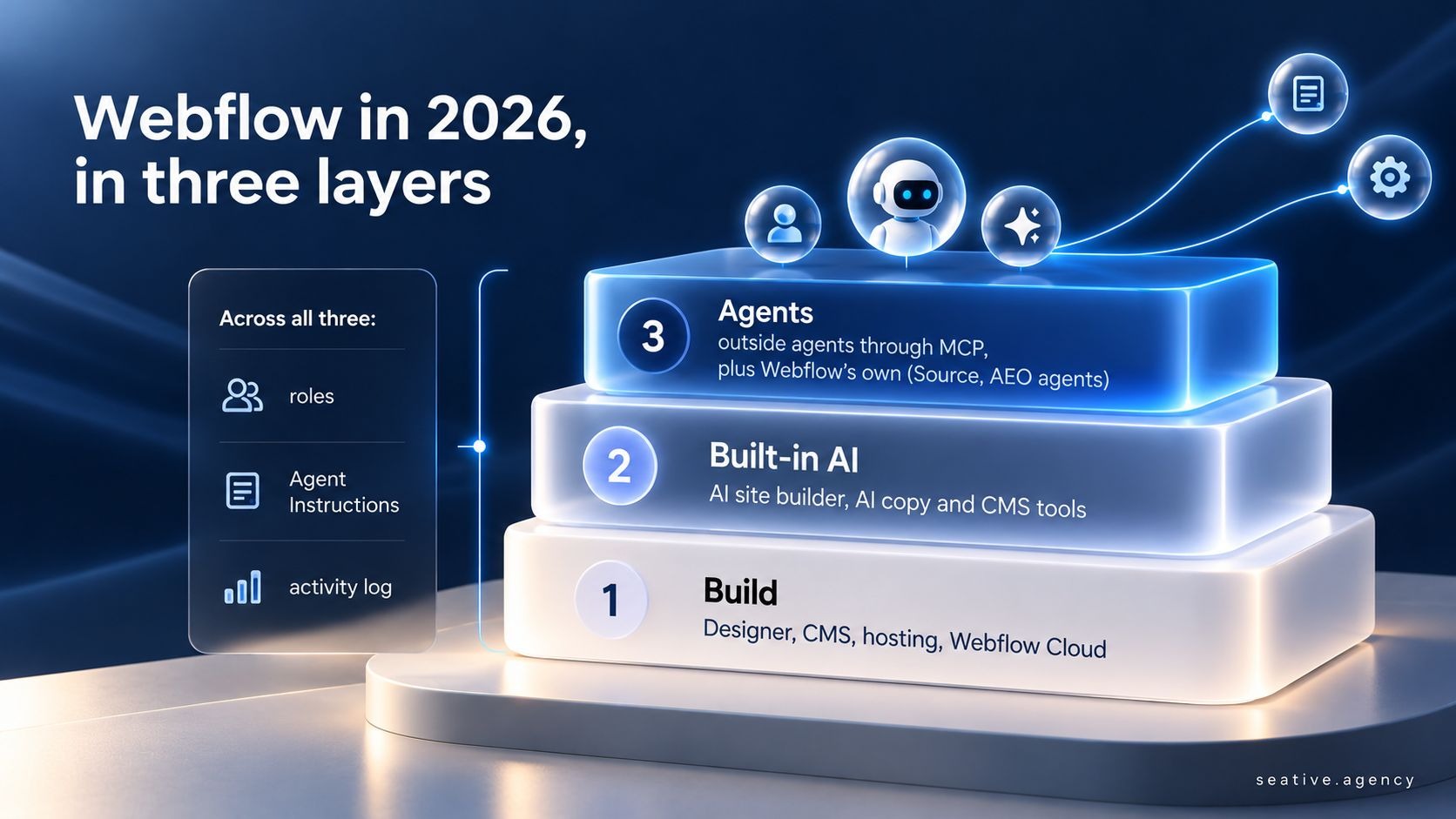
Webflow also added agents for answer engine optimization (AEO), which means getting your brand cited in AI answers. In its study of 2,000 companies, shared in Webflow's Conf 2026 announcements, the median company was cited in just 6% of relevant AI answers. So the AEO agents, included for Enterprise customers, hunt for topics where competitors get cited and you don't.
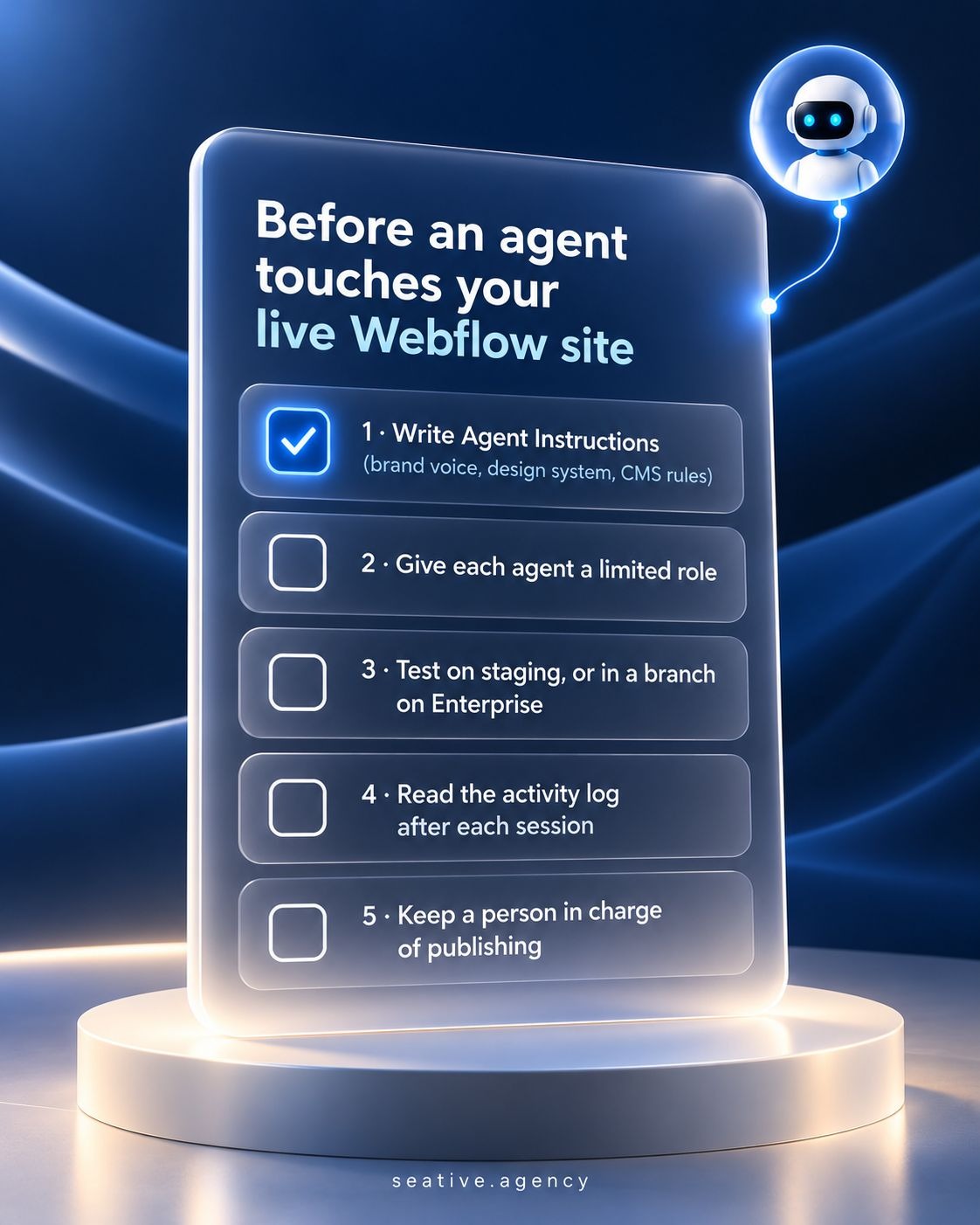
All these agents need checking, and a busy pharmacy shows how. Assistants prepare orders, the pharmacist checks each one, and every order is recorded. An agentic site should work the same way, with a person approving changes and the activity log keeping the record.
Fair question: what should you set up before an agent touches your live site? Here's the checklist I'd use:
Webflow is best for marketing websites that change often, where your team wants design control, a CMS and hosting in one place. It's a weaker fit for large online stores or app-heavy products, where Shopify or custom code usually serves you better.
None of those AI features can rescue a site built on the wrong platform. You've probably felt the problem Webflow solves if your marketers wait on a developer for every text change.
We're a Webflow Certified Partner, but we also build on Shopify, WordPress, Wix and custom code, so I'll tell you when Webflow isn't the answer. Which Should Your Business Use? covers the most common alternative, and what advanced web development means in 2026 helps if you need custom code.
[SUBASH STORY: a client who moved to Webflow from WordPress or Wix: why they switched and what changed for their marketing team. About 25 words.]
If you'd rather have a team plan, design and build it with you, that's what our Webflow website service is for.
Yes, the free Starter plan gives you a webflow.io address and two static pages. A custom domain needs a paid site plan, from $15 a month billed yearly on Webflow's pricing page in October 2026. Team seats and AI credits come from a separate Workspace plan.
No, you build visually and Webflow writes the code for you. Learning how web layouts work makes it much easier, though, and Webflow University's free Webflow 101 course covers those basics. Developers can still add custom code when a project needs it.
It depends on what you value. Webflow keeps design and hosting in one place, with security handled and no plugins to update. WordPress offers a huge plugin library and full control over hosting, but you or your host handle the updates. For a marketing site that changes weekly, I usually lean toward Webflow.
AI can build a solid first draft, but not the finished site. The AI site builder creates up to five editable pages, and MCP-connected assistants can add sections that follow your design system. A person still has to own the messaging, content, testing and final publish.
Yes, Webflow lets you control page titles, meta descriptions, URLs and image alt text, and it builds your sitemap automatically. Its AEO tools help you show up in AI answers, and Enterprise plans can track how often those answers mention you. Rankings still depend on content that answers real questions.
If someone asks you what's Webflow after today, tell them it's a visual way to build and host a website, with AI that drafts pages and agents that help run it. Your rules decide whether those agents save time or make a mess. So start on a free Starter site, try the AI site builder with a real brief, and connect Claude or ChatGPT there first.
If you'd like a second opinion on your site, book a 30-minute strategy call and we'll go through it together.