How does AI web design work? A 2026 field guide
The short answer to "how does AI web design work?" in 2026 is this. A large language model turns your brief into a sitemap, page layouts, copy and code, using patterns learned from a huge amount of existing web content. Newer tools also connect the model to your real design system and site. That lets AI agents edit Figma or Webflow directly while a person reviews each change.
That second part is new, and it changes what a website project looks like. Figma opened its canvas to AI agents this year, Webflow shipped MCP 2.0 in July 2026, and Google updated its guidance on AI-generated content on October 1, 2026.
This guide is for founders, product leads and marketing leads. It shows what happens inside these tools before you trust them with a site that has to bring in revenue.
Key takeaways
In this guide:
AI web design is the use of generative AI to plan, lay out, write, style and build websites. It happens either inside a website builder or inside the design and development tools a team already uses. In 2026 it shows up in three distinct modes, and most of the confusion online comes from treating them as one thing.
Most "AI website builder" articles only describe the first mode. The third is newer, and it's where I see the biggest change for companies that already have a site, a brand and a team.
AI web design works through four stacked layers. A model predicts designs and code, context tells it about your project, connections let it act inside real tools, and human review decides what ships. The model gets the headlines. In our projects, context and review decide whether the output is usable.
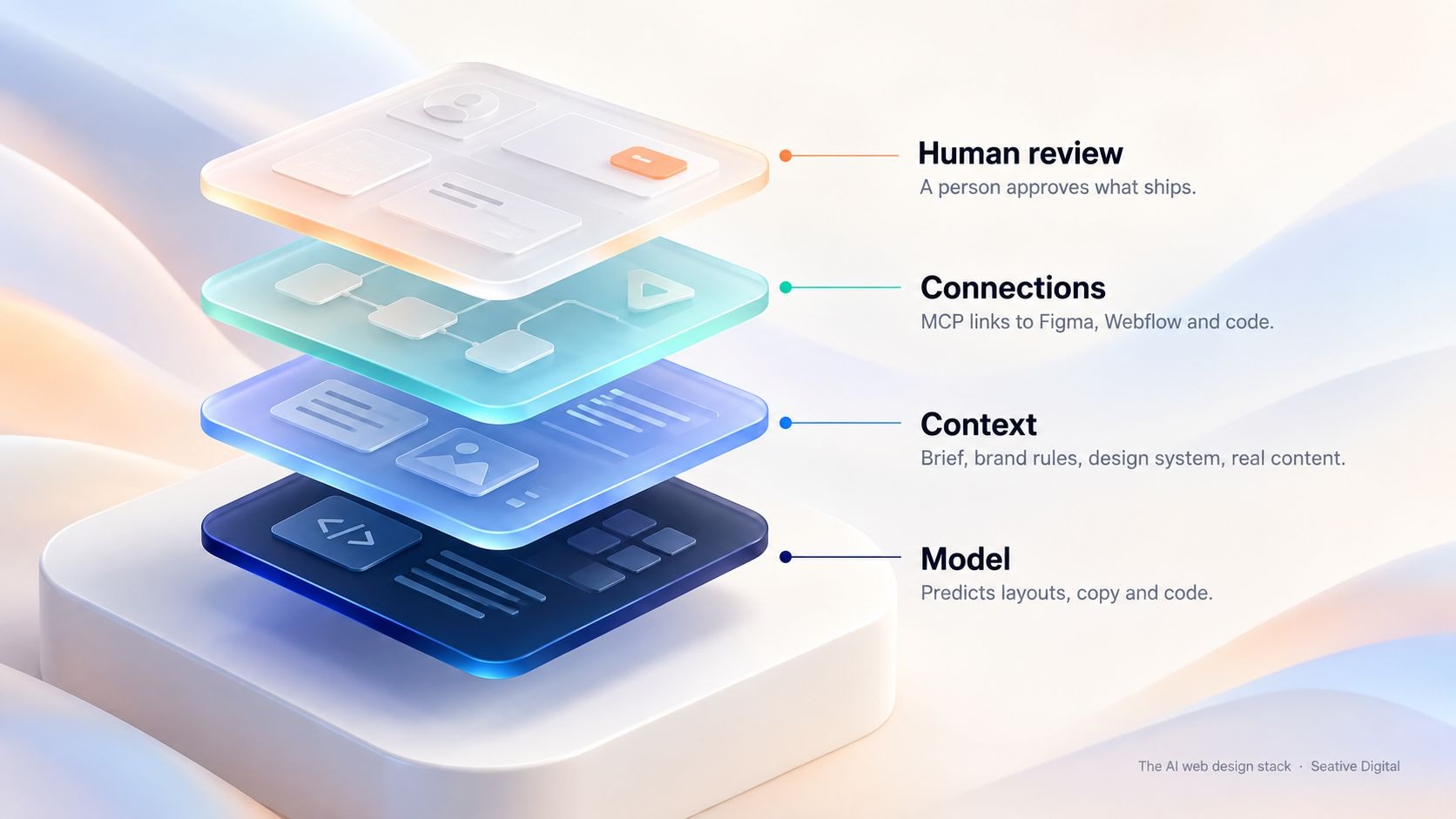
Each layer adds something the one below it can't do on its own.
Every AI web design tool sits on a large language model (LLM), often a multimodal one that reads both text and images. The model doesn't look up the right design for your business. It predicts the most likely next piece of output (a section, a line of CSS, a headline) from patterns in its training data.
That explains two things you'll notice on day one. First drafts look competent, because the model has seen countless competent sites. They also look alike, for exactly the same reason.
A centered headline, two buttons and a product screenshot is a statistically safe hero, so you'll get it often.
Context is everything the model knows about your project when it starts. That includes the brief, brand rules, your design system's components and design tokens (named values for color, spacing and type), real content and examples of what good looks like. The prompt is only a small slice of it.
This is the layer I'd spend your time on. A one-line prompt gets you the average of the internet.
A model that can read your component library, your tone-of-voice rules and your real product copy gets you something that looks and sounds like your company.
Tools now make this context reusable. Figma's MCP server passes components and variables to coding agents, and Webflow lets teams write agent instructions once so every agent follows the same brand and legal rules.
If your system isn't ready for that, start with a project or internal test where feeding real context (for example UnifiedUI components, brand rules or real product copy) clearly changed AI output compared with a bare prompt. What you gave the AI, what the first output looked like, and what changed.

Connections decide whether AI can only suggest or can also act. Most of them now run on the Model Context Protocol (MCP), an open standard Anthropic introduced in November 2024. It gives AI applications one consistent way to connect to outside tools and data.
A product exposes an MCP server, and an AI client such as Claude, ChatGPT or Cursor connects to it.
In practice, an agent in a code editor can read a Figma frame, build it in code and push design changes back to the canvas. The same agent can create CMS items, pages and styles in Webflow. Before MCP, each of those links needed its own custom integration work.
Review is the layer no tool removes. Someone with design, content and technical judgement checks the output against the brief, the brand, accessibility standards and search guidelines, then approves, fixes or rejects it. The better platforms now design for this with branches, permissions and activity logs, which the next sections cover.
Most AI-powered web design tools follow the same six-step pipeline. They read your brief, plan a sitemap, map sections to layout patterns, generate content, apply a visual style and output editable work. Knowing the steps helps you see where a draft went wrong and what to fix first.
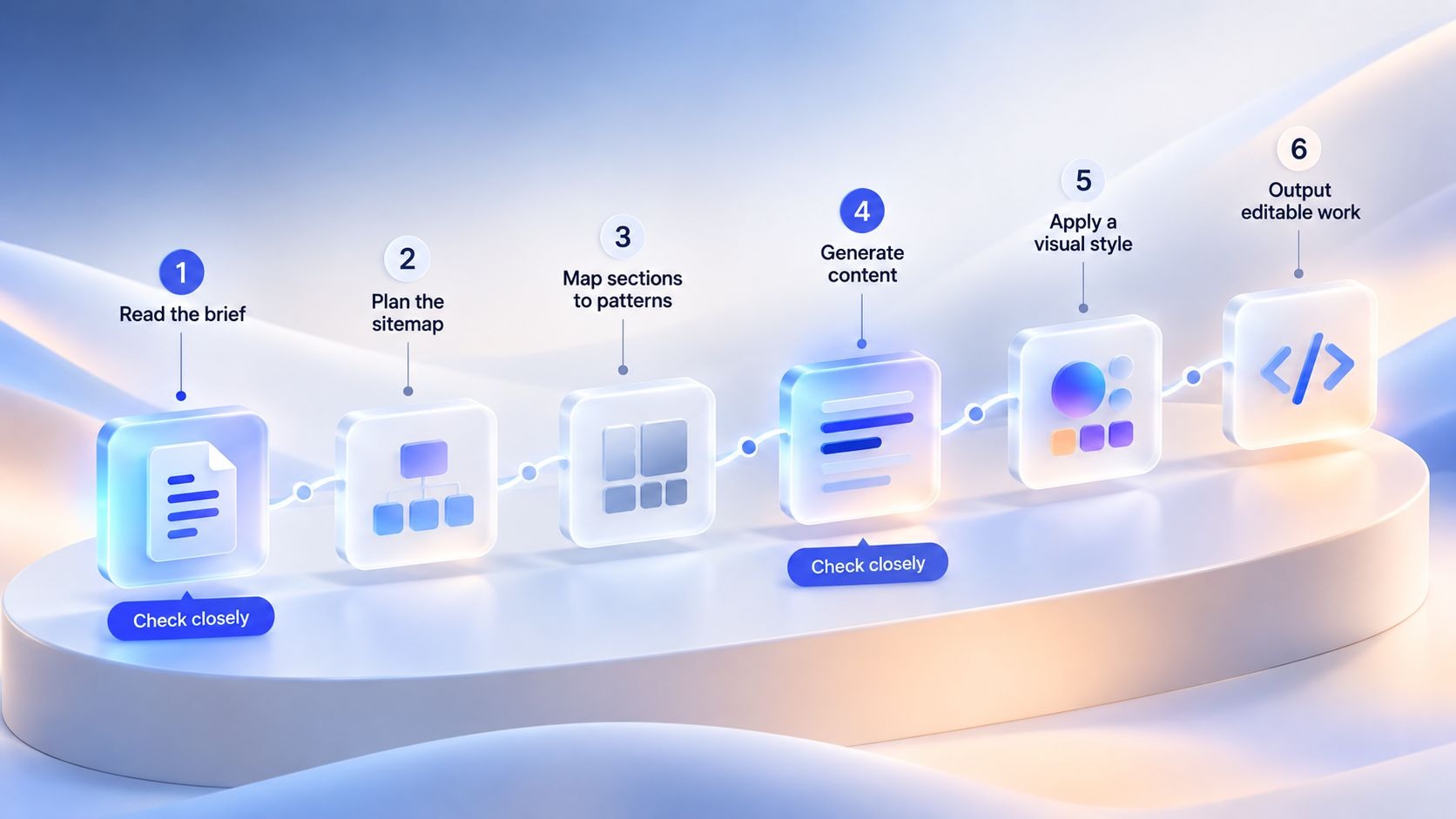
The six-step pipeline behind most prompt-to-site builders:
If you only improve one step, make it step 1. Everything downstream inherits its gaps.
An agentic workflow is one where an AI agent works toward a goal instead of answering a single prompt. It plans the steps, uses tools to carry them out and checks the result. In web design, 2026 is when this moved from demos into the tools teams use every day, mostly through MCP connections to Figma and Webflow.
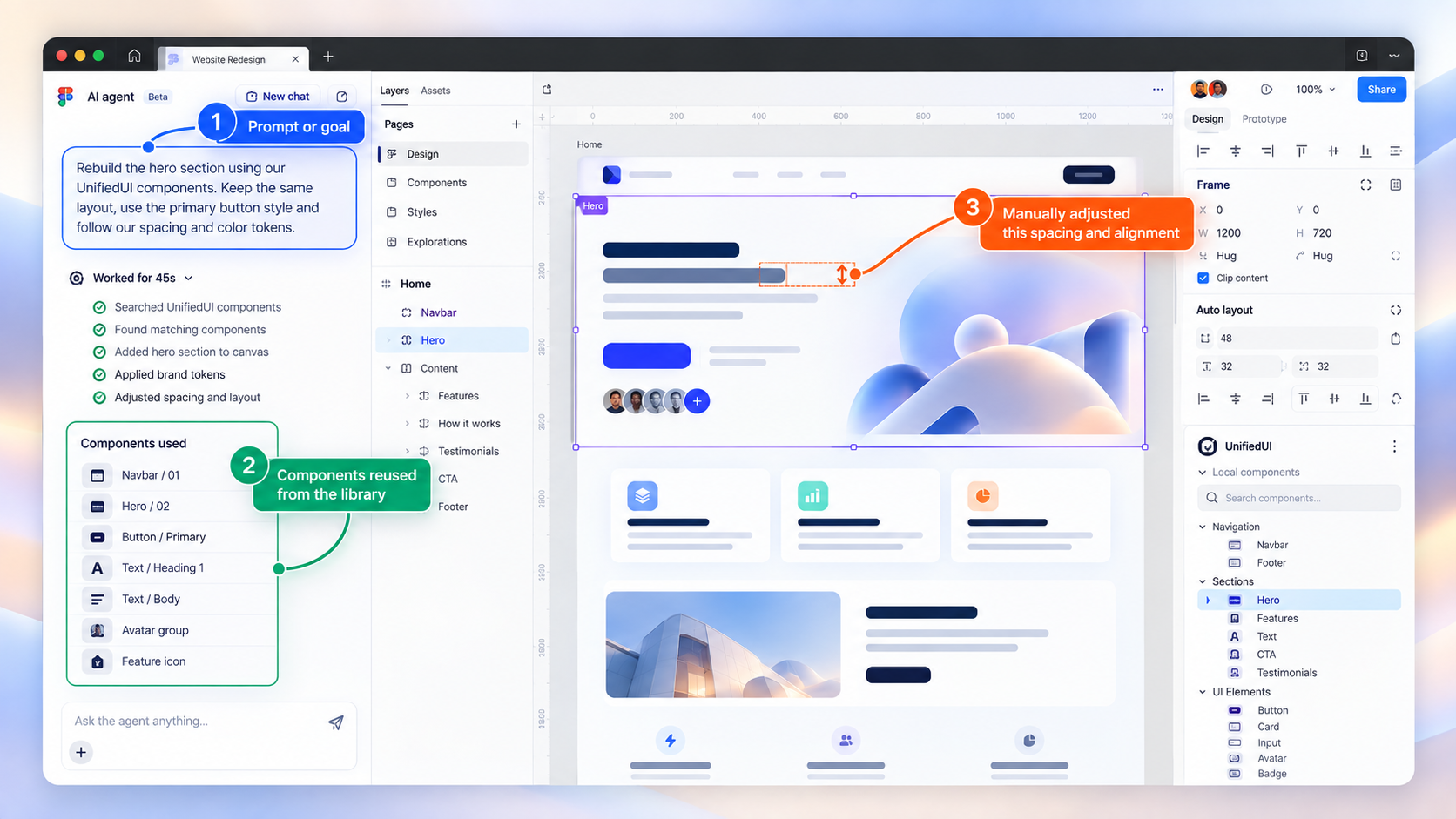
Figma launched its own design agent in May 2026. By June, Figma's write-up of four MCP workflows showed its MCP server working across Figma Design, FigJam, Figma Slides and Figma Make.
In one example, a designer pulled a Make prototype back onto the canvas as layers built from her component library. She gave a component new default, hover and drag states, then had the agent write those states back into code as a pull request.
The same post is candid about limits. Pushing a code-only screen into Figma produced a strong first pass, but layout, fonts and some unmapped colors still needed fixing. As of that post, the Figma agent and Make's production codebase integration were in closed beta, and the MCP server's write features were in open beta.
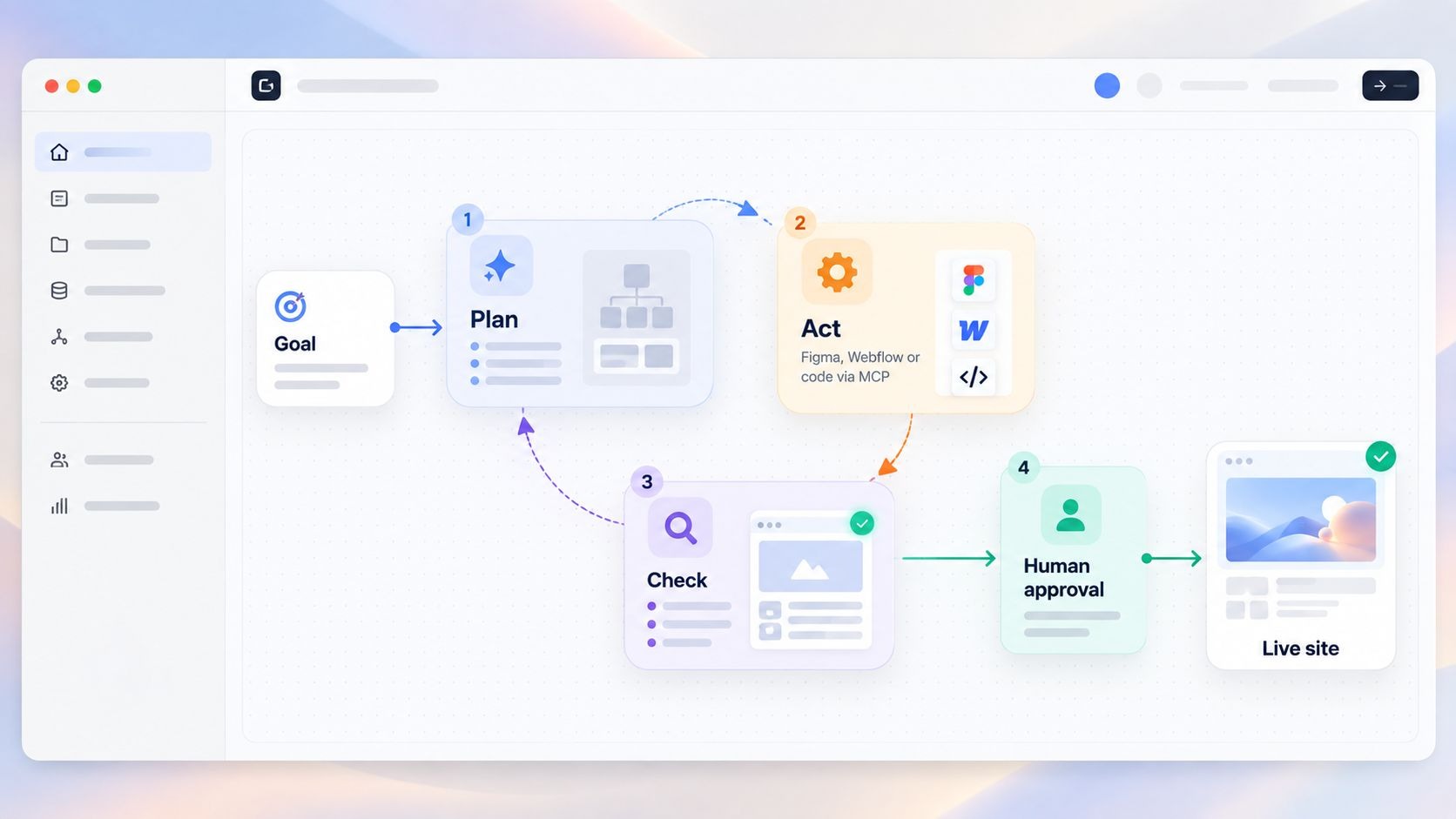
Webflow released MCP 2.0 on July 21, 2026. According to Webflow's MCP 2.0 announcement, agents in tools like Claude, ChatGPT and Cursor can now build with a site's design system and read Webflow Analyze data. They can also follow shared agent instructions and work on branches before changes reach the live site.
It's available to all Webflow users at no extra cost, and Webflow says it respects team roles and logs AI actions with attribution.
Agents are real, but still early for most companies. McKinsey's State of AI survey found that 88% of organizations use AI in at least one business function. Yet only 23% are scaling an agentic AI system anywhere in the business, and no more than 10% are scaling agents in any single function. If your team isn't running design agents yet, you're in the majority.
The right mode depends on what you're building and who will maintain it after launch. Prompt-to-site builders are fastest for a simple first site. Copilots suit teams that want control over every decision, and agents pay off once you have a design system and a site you update often.
Choose a builder if you need something live this week and the site isn't your main sales channel yet. Move to copilots or agents once the site drives the pipeline, because structure, brand consistency and maintainability start costing real money when they're wrong.
AI improves web design mainly through speed: faster research, more directions to compare, quicker content drafts and less repetitive production. It falls short on judgement, originality, accessibility and factual accuracy. The speed only helps if your review process keeps up with it.
Here's where AI earns its place in a design workflow:
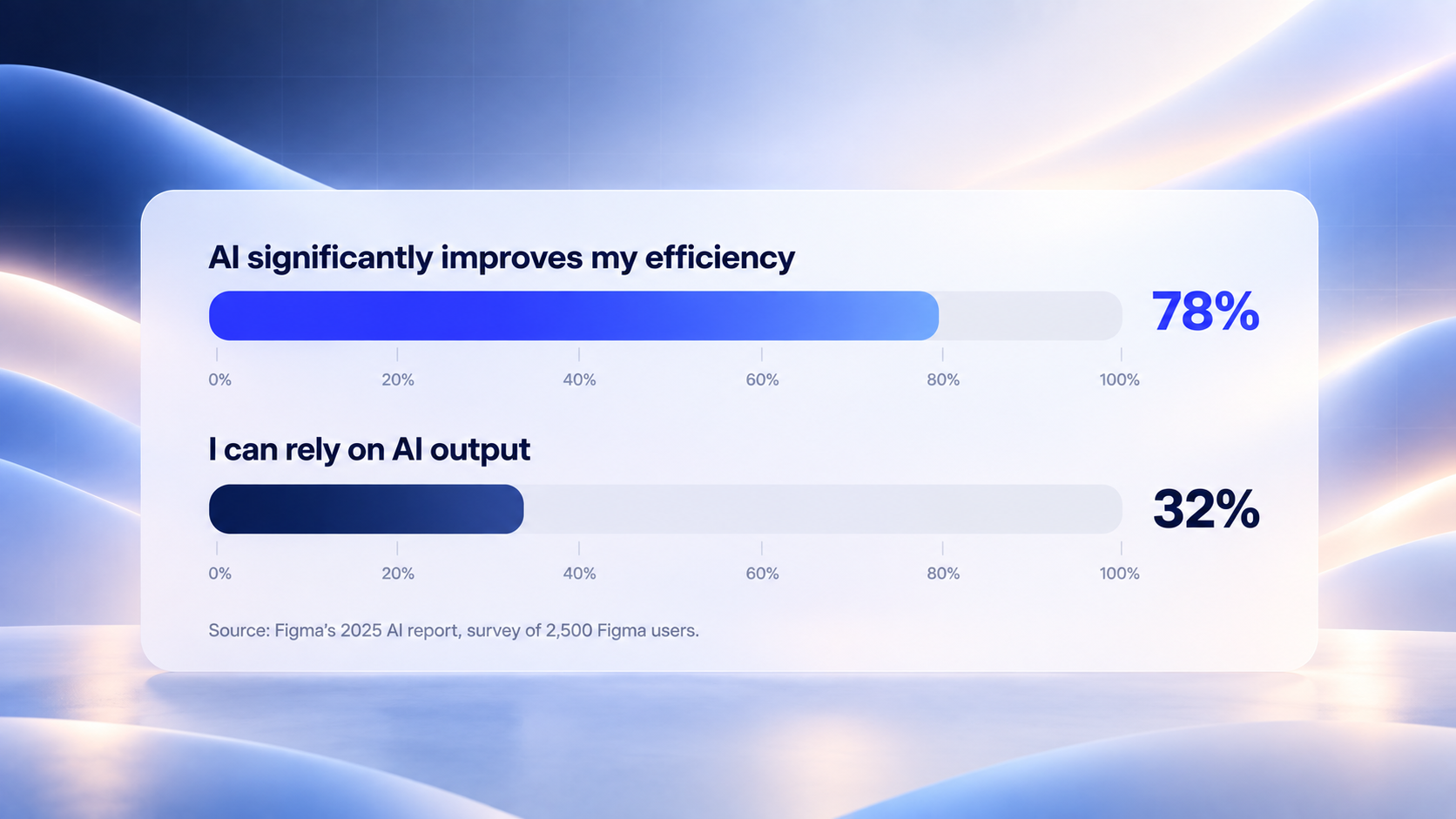
The gaps are just as clear. Figma's 2025 AI report surveyed 2,500 Figma users. It found that 78% agree AI makes their work significantly more efficient, but only 32% say they can rely on its output. That gap is the review layer in numbers.
Accessibility is the gap I'd worry about most. The WebAIM Million 2026 report found detectable WCAG 2 failures on 95.9% of the top one million home pages, up from 94.8% in 2025. The average page had 56.1 errors.
WebAIM ties the rise to growing page complexity and names AI-assisted coding ("vibe coding") as one likely factor. Six error types make up 96% of everything detected: low-contrast text, missing alt text, missing form labels, empty links, empty buttons and missing document language. Those are exactly the details a model skips when nobody tells it to care.
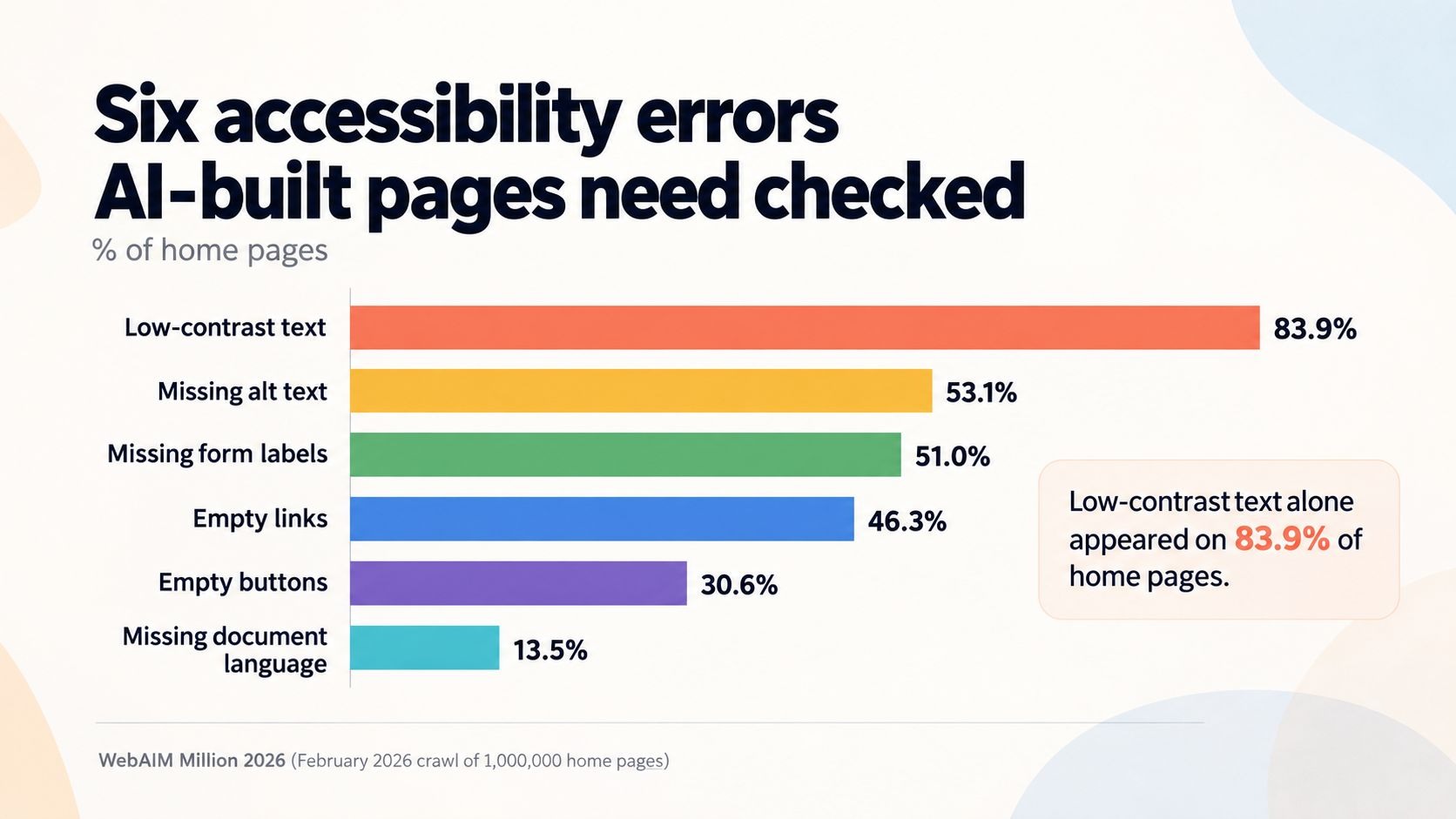
Low-contrast text alone appeared on 83.9% of home pages in WebAIM's 2026 analysis.
Search is the third gap. On October 1, 2026, Google updated its Search Central guidance on generative AI content. The update explains that generative models predict likely words instead of retrieving facts, so a person should fact-check AI-generated content before it's published.
Google spells out that this includes page titles, meta descriptions, structured data and image alt text. It also warns that generating many pages without adding value for users can breach its spam policy on scaled content abuse.
At Seative Digital, AI sits inside our seven-stage process instead of replacing it. AI speeds up research, exploration and repetitive production, and experienced designers refine every output before it reaches a client or a live site. The table shows where that line sits for us.
If you'd like this process applied to your own site, our AI web design services pair AI speed with senior design review at every stage.
Before any AI-built page goes live, review it for brand fit, factual accuracy, accessibility, search metadata, performance and structure. At Seative Digital we call this the AI output review: ten checks aimed at the mistakes AI tools make most often. Checks 3 to 7 map directly to the six error types behind 96% of the errors WebAIM detected.
AI-first web design is the wrong starting point when the site's value depends on things a model can't learn from patterns. Think complex product logic, regulated claims, or a brand that has to look unlike its category. In those cases we still use AI, just later in the process and on narrower tasks.
Yes, AI can generate a complete draft website from a short prompt, including pages, layouts, copy and styling. What it can't do on its own is decide what your business needs, check its own facts or guarantee accessibility. Treat the output as a first draft that a person with design and content judgement reviews before launch.
AI is replacing parts of web design work, mainly repetitive production and first-draft layouts, but not the decisions. Someone still has to set the strategy, write the agent instructions, judge which direction fits the brand and approve what ships. Designers whose work was mostly production are most exposed; those who own direction and review are becoming more valuable.
No, using AI isn't a ranking problem by itself. Google's guidance says the risk comes from publishing many pages without adding value, which can breach its scaled content abuse policy, and from errors nobody checked. Fact-check AI-written text, titles, meta descriptions, structured data and alt text before publishing, and make sure each page answers a real question.
MCP, the Model Context Protocol, is an open standard that lets AI applications connect to outside tools and data in one consistent way. In web design, Figma and Webflow both run MCP servers. An agent in Claude, ChatGPT or Cursor can then read your design system, edit layouts or update CMS content directly, instead of only suggesting changes.
Cost depends on the route. A prompt-to-site builder runs on a monthly subscription, while agent workflows add AI usage costs on top of your design and site tools. A professionally designed site built with AI assistance costs more upfront because senior people still own strategy and review. Ask any provider to separate tool costs from people costs in their quote.
Give it context, not just a prompt. Share your audience and their main objections, your brand rules, real product copy, a few sites you admire and why, and your design system if you have one. The more specific the input, the less the model falls back on generic patterns.
AI lets a small team cover more ground: faster research, more directions explored, and variants and content produced without extra hires. The trade-off is that someone on the team must own a review. Without that, the time saved in production gets spent later fixing brand drift, accessibility errors and inaccurate claims.
When someone asks me "how does AI web design work?", I now answer with the stack instead of a tool list. Tools will keep changing every few months, while the model, the context, the connections and the review stay the same. Put your effort into the context you give AI and the review you run after it, and you'll get the speed without shipping someone else's average website.
If you're weighing an AI-built site against a designed one, book a 30-minute strategy call and we'll review your brief together.