What Is Advanced Web Development? 2026 Guide for Founders
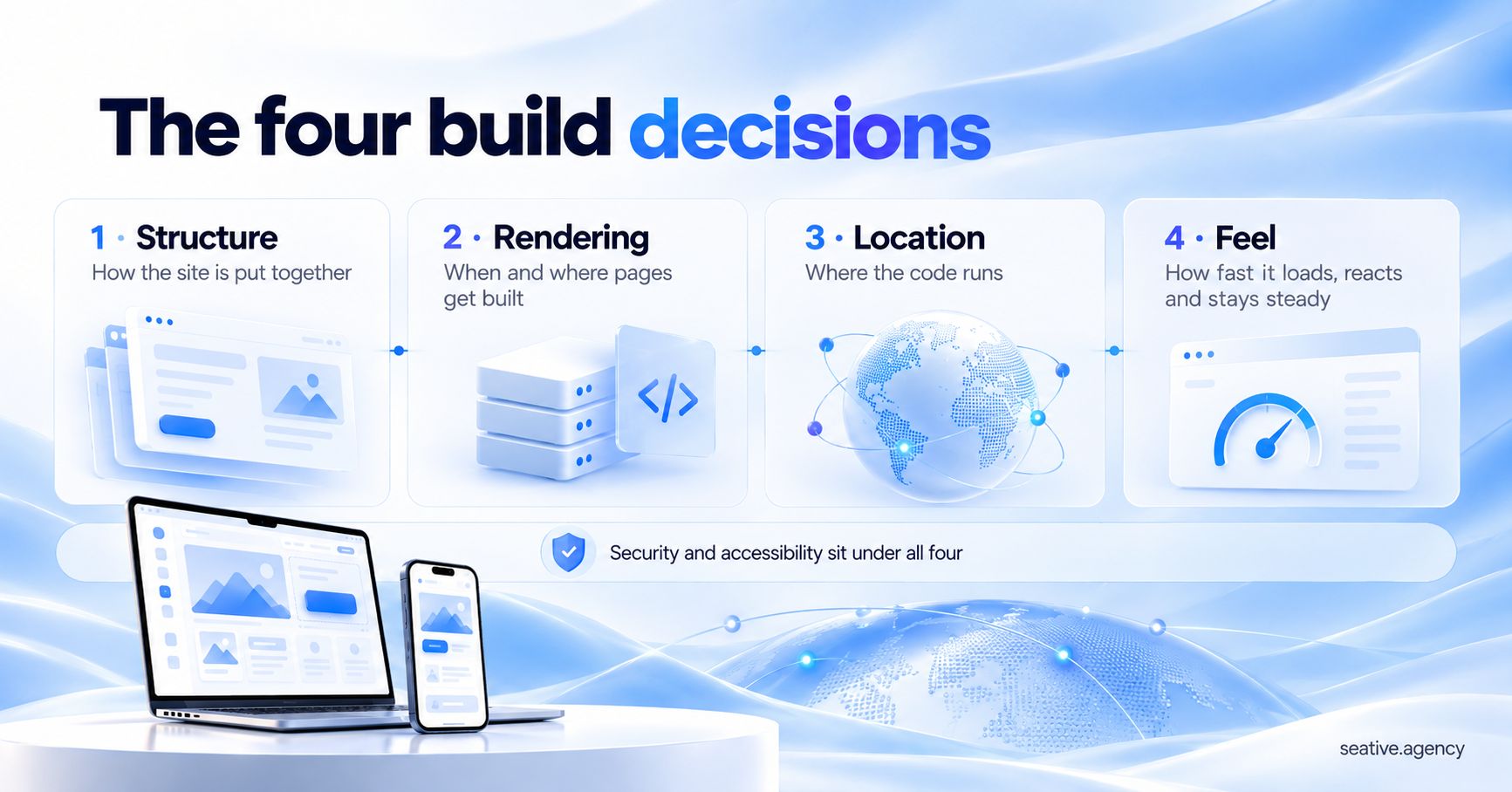
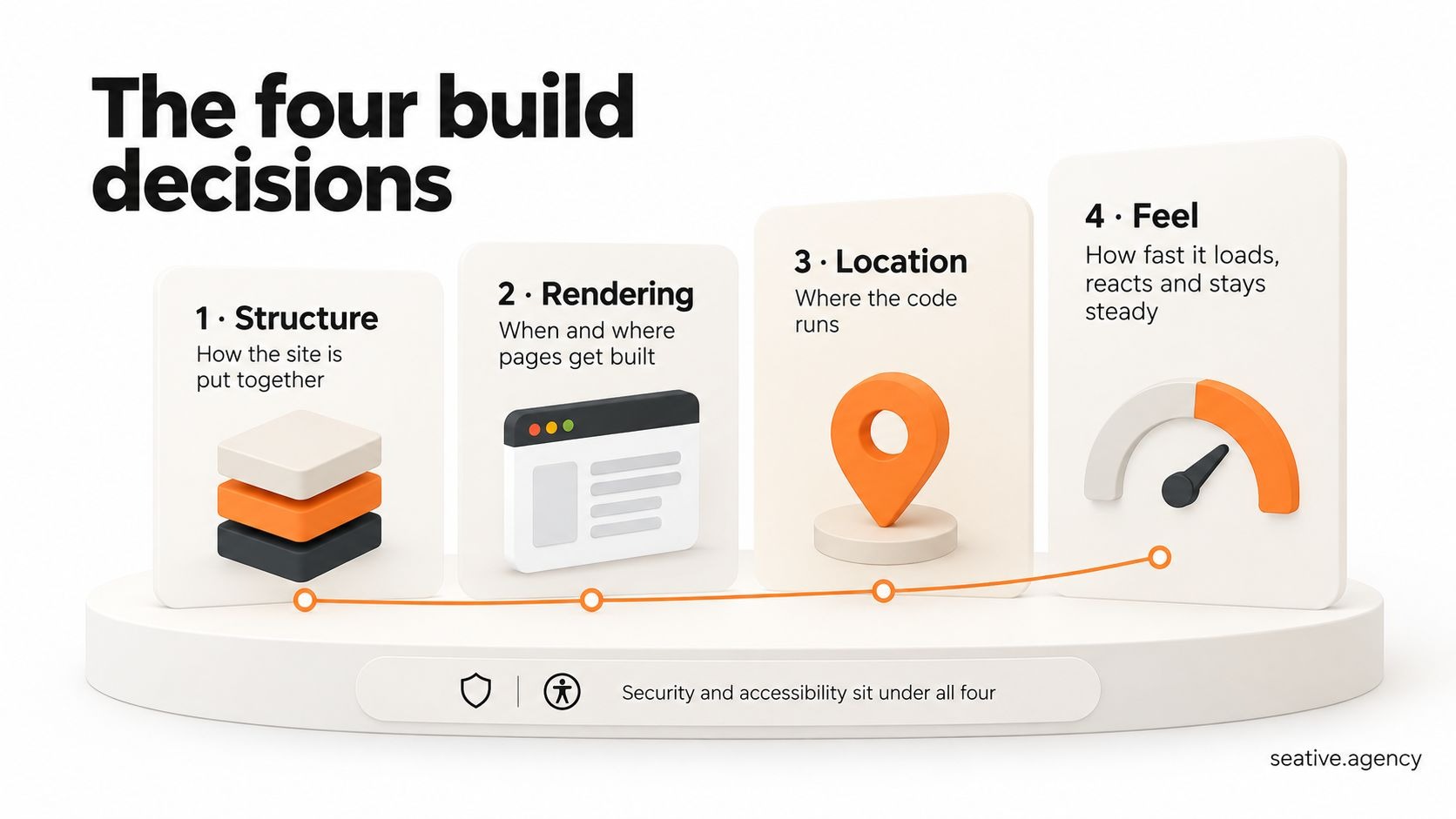
The simplest answer to "what is advanced web development" is this: it's building websites and web apps where the big technical choices are made on purpose. That means planning how the site is structured, where each page gets built, where the code runs, and how fast pages load and respond on an everyday phone.
Basic web development gets you online, while advanced web development keeps you fast as traffic grows. I wrote this guide for founders and marketing leads who want to understand these choices before paying for them.
Key takeaways
In this guide
Advanced web development is web development where a site's structure, rendering, hosting and speed are planned as one system. That system still runs on everyday front-end and back-end skills, but every choice is made with traffic and growth in mind.
Think about how a restaurant kitchen plans for the evening rush, compared with cooking dinner at home. Both make food, but the restaurant sets up its stations so a hundred plates go out hot and on time. A basic website is the home kitchen, and advanced web development is the restaurant's planning.
That planning starts from a new place in 2026. Next.js now renders on the server by default, and AI coding tools are part of daily work. Google has also judged pages by Interaction to Next Paint (INP), which measures how fast a page reacts, since March 2024. So it helps to see the field as four decisions, and you've probably made a couple already without noticing:
Security and accessibility sit underneath all four, so treat them as must-haves rather than options.
Most business sites fit one of three structures: an all-in-one platform like Webflow, Shopify, WordPress or Wix, a headless setup where content and front end are separate, or a hybrid of both. The right one depends on how much custom logic your business needs. Structure comes first because it limits every later choice.
A shop shows the difference well. In a small corner shop, what customers see and the stock behind it share one room, which is simple but hard to grow. A headless setup splits the shop window (what visitors see) from the stockroom (where content and products live), so you can redesign the window without moving a box. The catch is the corridor between them: an API, which passes data between systems and needs someone to build and maintain it.
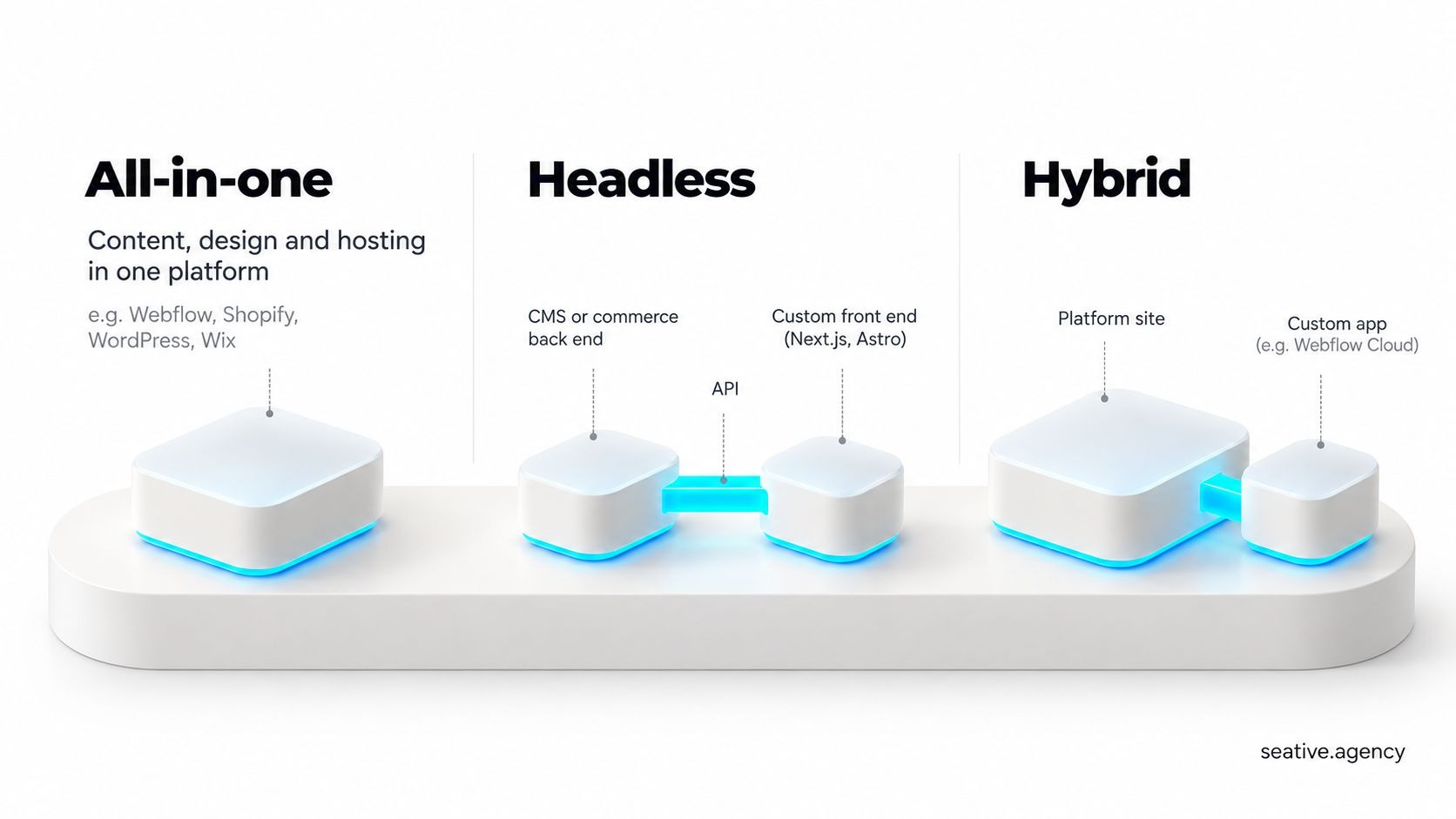
You might be thinking headless sounds like the professional choice. For a ten-page marketing site it usually isn't, because you'd pay for flexibility you never use. The hybrid route has also become easier, since Webflow Cloud now hosts Next.js and Astro apps alongside a Webflow site.
Build a page ahead of time when it looks the same for every visitor, and build it on request only when content is personal or changes by the minute. That rule covers most business sites, and it's the core of the second decision.
I know this sounds technical, but a page can only be built in three places. Static site generation (SSG) builds it once, at publish time. Server-side rendering (SSR) builds it fresh on every visit, and client-side rendering (CSR) builds it in the visitor's browser with JavaScript.
The first two are easy to picture at a busy bus stop. Its printed timetable is static rendering, made once and quick to read, while the live arrival screen is server rendering, always fresh but reliant on the control room. Unlike paper, though, a static page can be reprinted on a schedule every few minutes, which is called incremental static regeneration (ISR).
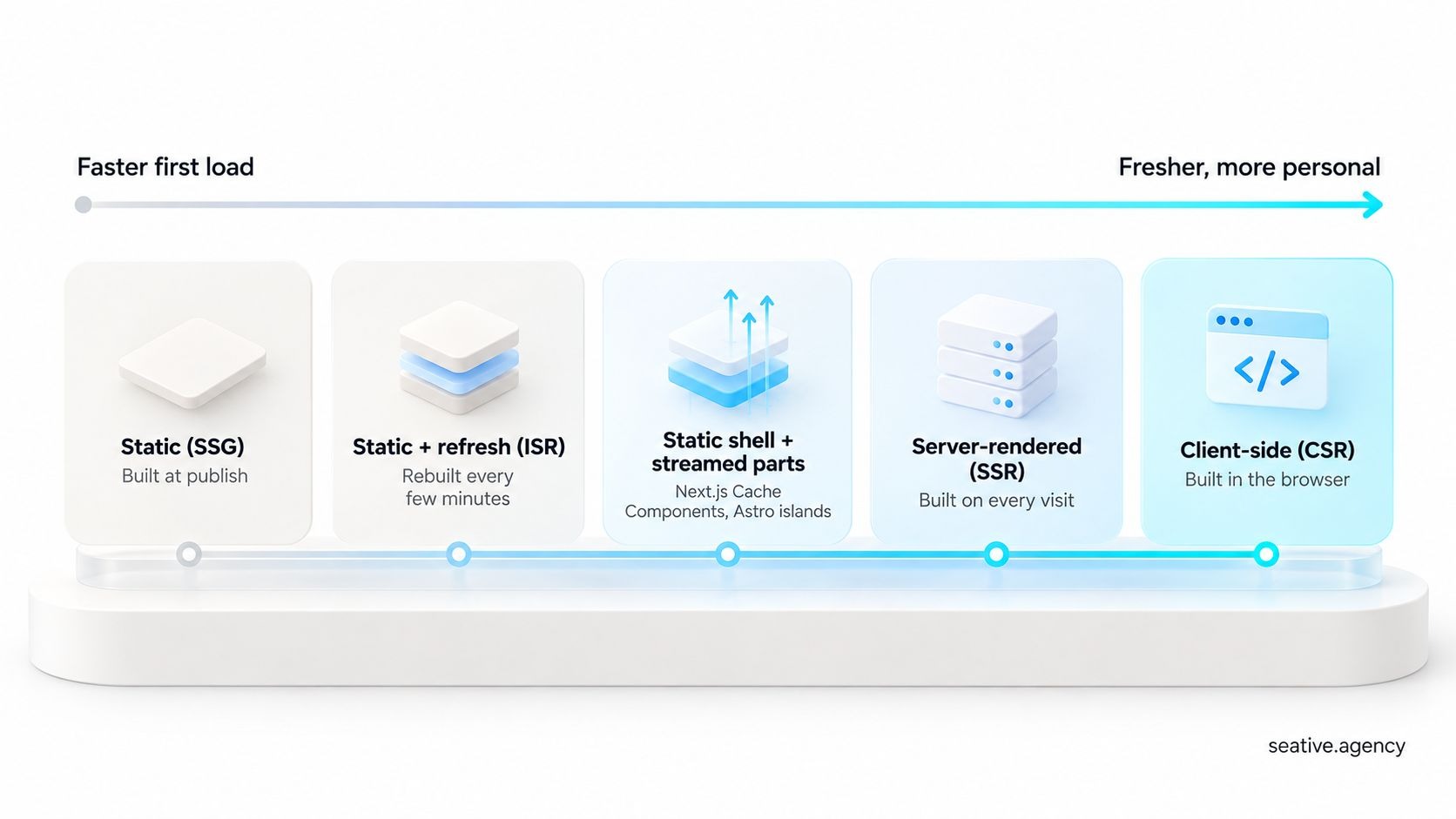
Modern frameworks mix both on one page. Next.js 16, released in October 2025, added Cache Components, so a product page can show a static shell instantly while price and stock stream in. Astro, which Cloudflare acquired in January 2026, uses "islands", where only the small interactive parts load JavaScript.
Mixing static and server rendering matters for speed, because Google's web.dev guide to rendering on the web recommends both over full rehydration. Rehydration is when the browser re-runs a page's JavaScript before buttons work, and it's why some pages look ready but ignore your first clicks.
Here's how I'd match common pages:
Edge rendering isn't always faster. It builds pages on servers close to each visitor, but any data from a distant database still has to make the long trip. My rule of thumb for 2026 is to cache at the edge and compute near your data.
Location is the third decision. An edge network is a set of servers in many cities, first used as a content delivery network (CDN) to store copies of files. Running code there aims to cut Time to First Byte (TTFB), which is the wait before the server responds.
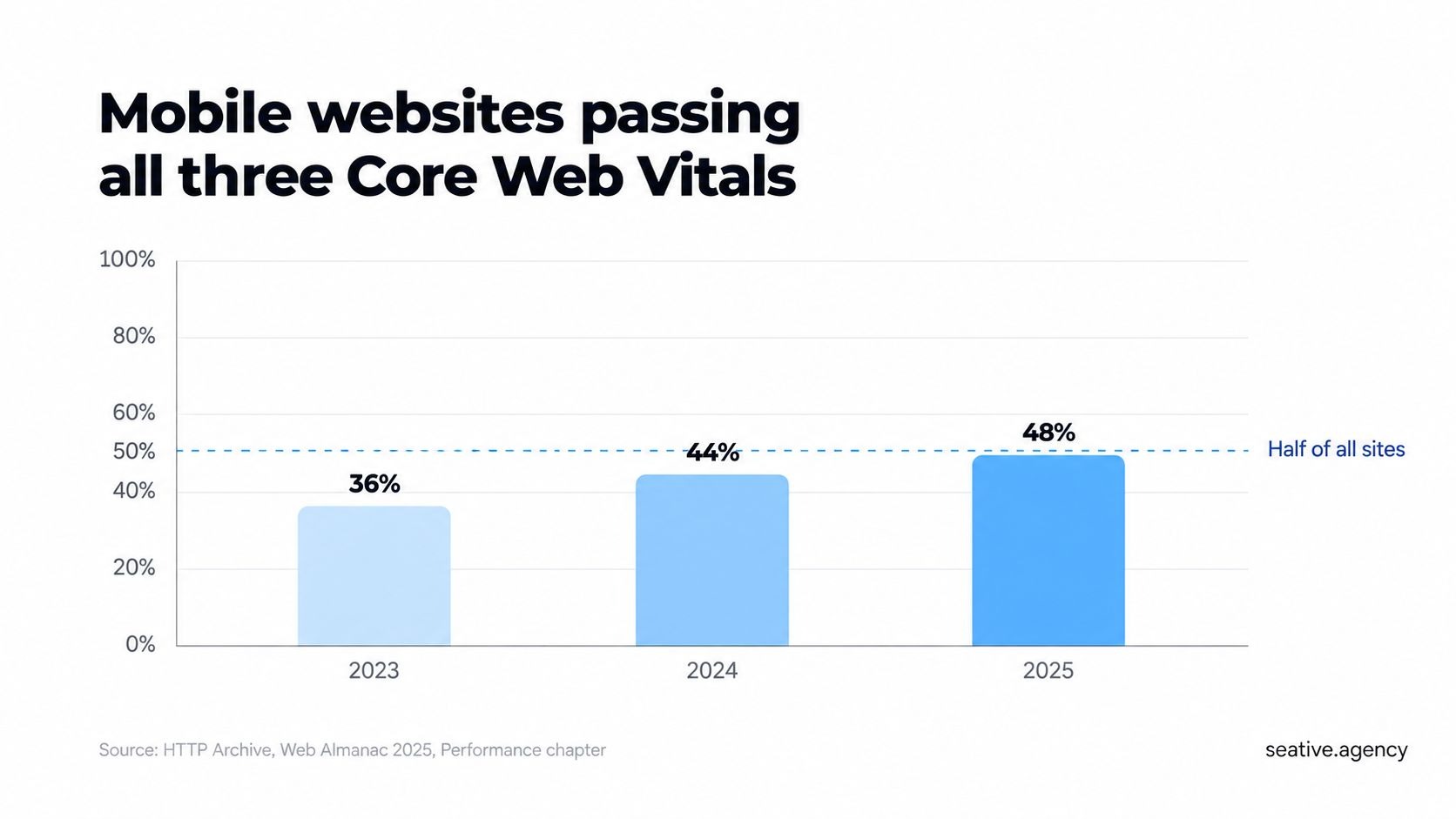
TTFB needs the help, since only 44% of mobile websites had a good score in HTTP Archive's 2025 Web Almanac. Stick with me here, because this is the part most guides skip.
Think about a pharmacy branch near your home. Everyday medicines sit on the shelf, but anything only the central warehouse stocks still has to come from there. The edge server is the branch, a cached page is the shelf stock and your database is the warehouse. Online, though, you can move the pharmacist next to the warehouse.
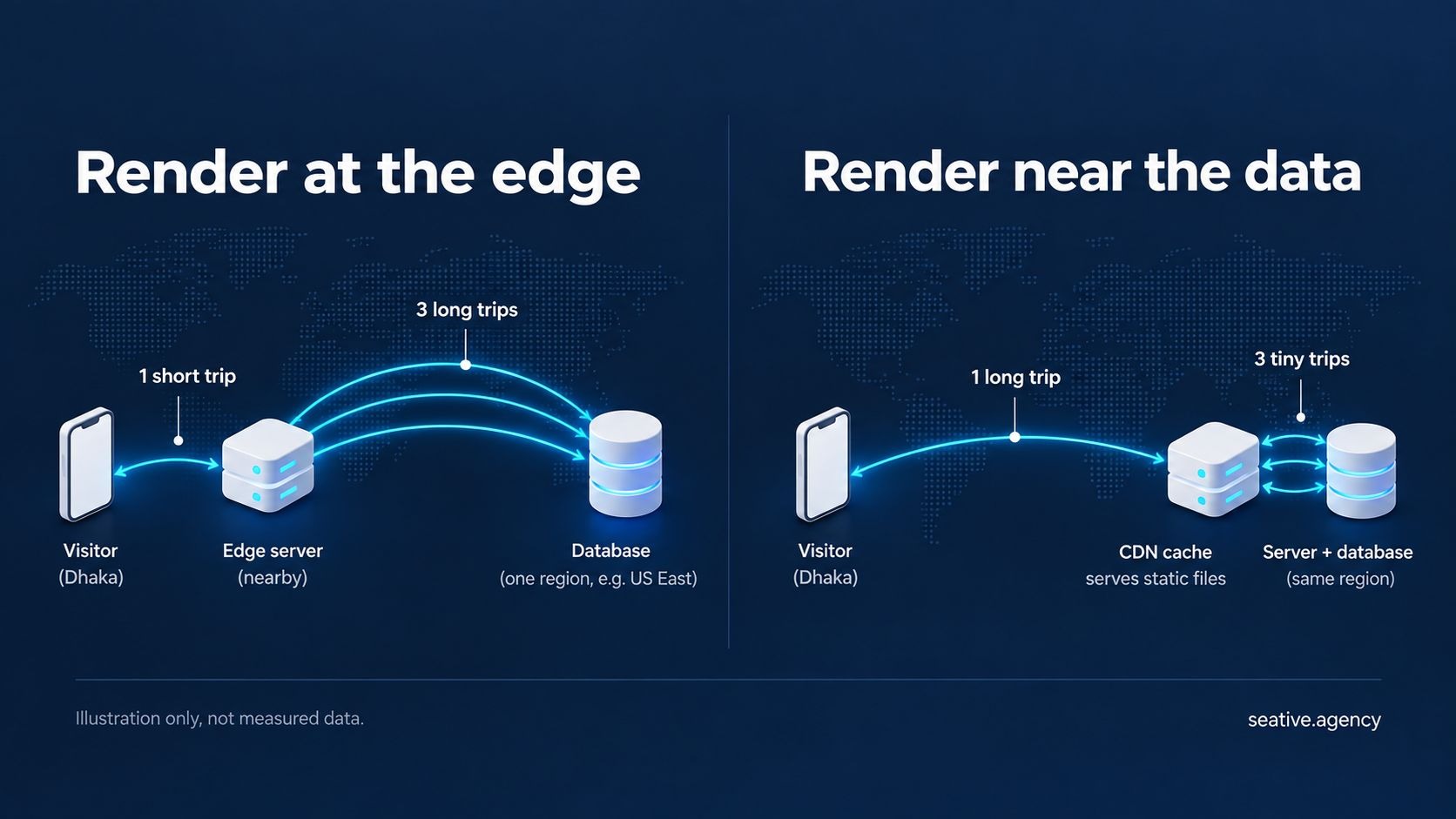
Moving code next to the data is where the big platforms have gone. Vercel's edge runtime documentation now says, "We recommend migrating from edge to Node.js for improved performance and reliability." And from Next.js 16.3, pages can't use the edge runtime. Cloudflare's Smart Placement takes another path, moving a Worker (a small piece of server code) closer to the database it keeps calling.
So keep static pages and files on a CDN, and save edge code for small jobs like redirects. Then render data-heavy pages in the same region as your database.
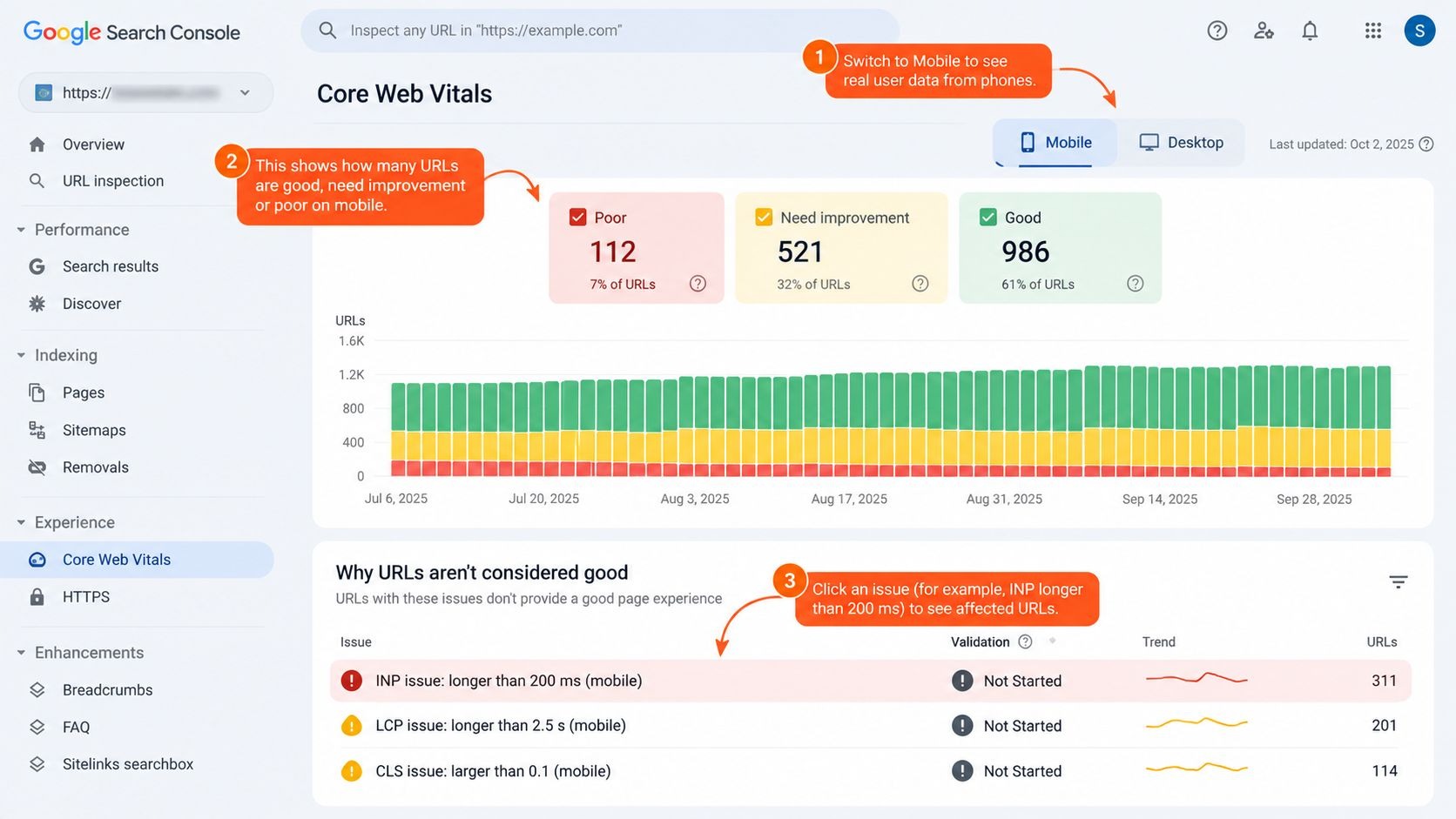
The numbers that matter most are Google's Core Web Vitals: Largest Contentful Paint (LCP), Interaction to Next Paint (INP) and Cumulative Layout Shift (CLS). Google Search Central's Core Web Vitals guidance calls a page good when LCP happens within 2.5 seconds, INP is under 200 milliseconds and CLS is under 0.1.
This is the fourth decision, feel, and if you've ever waited for a page on mobile data, you know why it matters. The 2025 Web Almanac shows how mobile sites did:
INP is the hardest to picture, so imagine a TV remote with weak batteries. You press a button, nothing happens, so you press it again, and visitors treat a slow page the same way.
Slow buttons cost you more than rankings, too. QuintoAndar, a Brazilian property site, cut its INP by 80% and reported a 36% rise in conversions year over year, according to web.dev's QuintoAndar case study.
Two fixes come up again and again. Don't lazy-load your hero image, which the Web Almanac found about 16 to 17% of pages still do. Then split long JavaScript tasks so the page can respond between them. On top of that, the Speculation Rules API lets Chrome and Edge load the next page before a visitor clicks, and WordPress now includes it by default.
AI tools now handle a lot of first-draft work, but they don't make the four decisions for you. In the 2025 Stack Overflow Developer Survey, 84% of developers said they use or plan to use AI tools, yet 46% distrust the accuracy of the output.
Fair question, then: why not let AI pick your architecture too? Because AI doesn't know your traffic or budget unless someone feeds it that context and checks the answer. At Seative Digital, we use AI to speed up research, exploration and repetitive tasks, and experienced people refine every output before it ships.
You need it when speed, scale or custom features affect revenue, as with an online store, a SaaS product, a site with logins or an audience spread across continents. A five-page brochure site usually doesn't, and a well-built Webflow or WordPress site will serve it better.
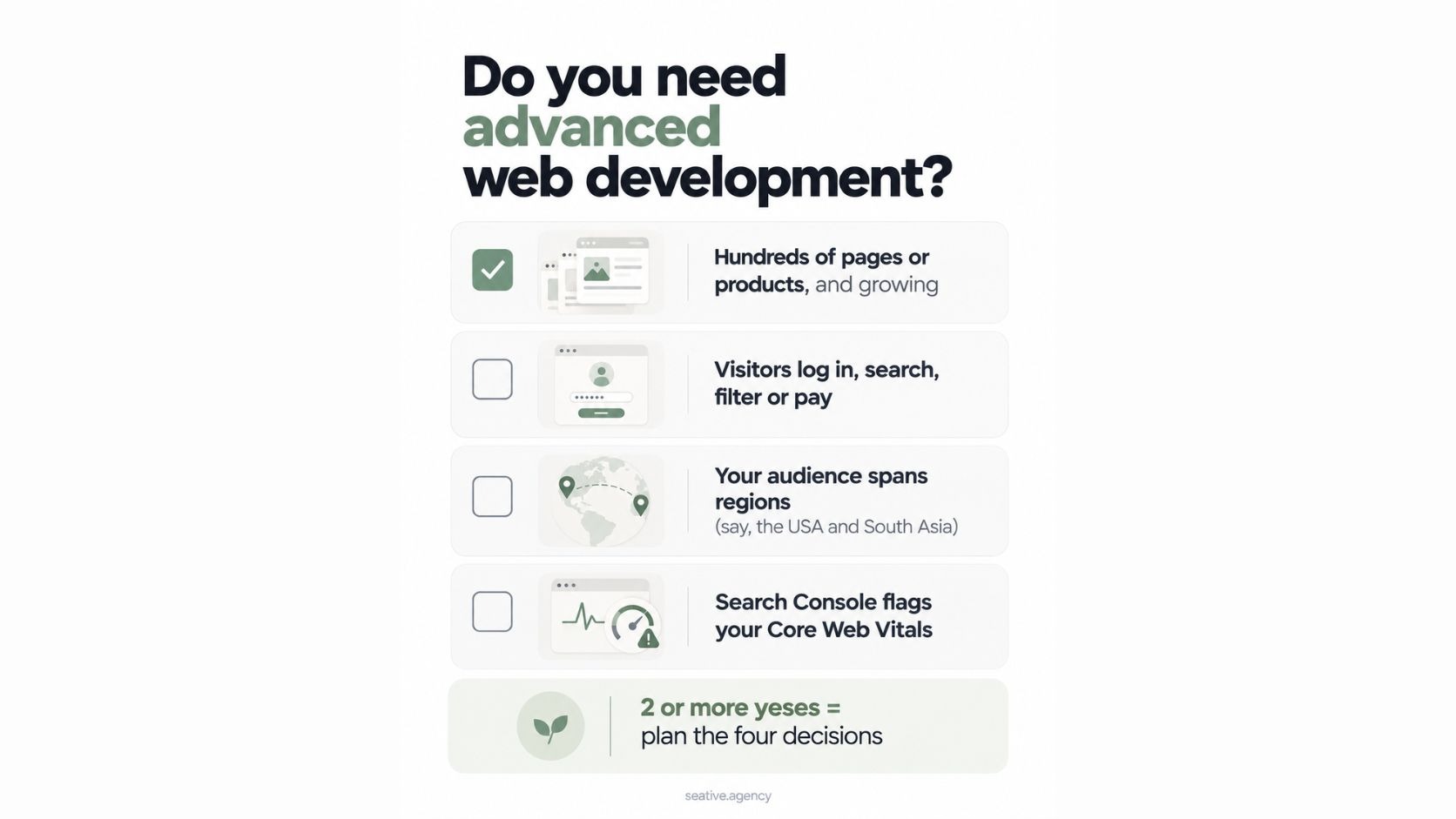
So the four decisions always exist, but they only need deep planning when mistakes cost you sales. Chances are you already have a hunch about your own site, so check it against this list:
If two or more sound familiar, the four decisions deserve a proper plan. And if you'd rather work through them with a partner, that's the kind of work Seative Digital's web development team does.
The three types are front-end, back-end and full-stack. Front-end is what visitors see and click, back-end is the server and database behind it, and full-stack covers both. Advanced web development sits across all three as the planning layer that shapes each one.
Only for pages that need little data from a distant database. Edge rendering suits light jobs like redirects and simple personal touches. For data-heavy pages, rendering in your database's region is usually quicker, which is why Cloudflare built Smart Placement and Vercel now points teams to Node.js.
Yes, as one signal among many. Google's documentation says good Core Web Vitals align with what its ranking systems reward and recommends achieving them. Helpful content still comes first, so speed works best on a page that already answers the question.
Not one you'd trust with revenue yet. AI can produce components and whole pages quickly, but 66% of developers in the 2025 Stack Overflow survey named output that's "almost right, but not quite" as their top frustration. Someone experienced still has to make the structural calls and check the code.
Cost depends on scope rather than a fixed rate. The main drivers are the number of custom features, headless versus platform, integrations (payments, CRM, search, email) and ongoing maintenance. A short discovery phase is the most reliable way to get a real estimate.
So the real answer to "what is advanced web development" is four decisions made on purpose: structure, rendering, location and feel. Get those right and the framework you choose matters far less than online debates suggest. A good first step is the Core Web Vitals report in Google Search Console, since it shows where real visitors are waiting.
If you'd like a second pair of eyes on your site, book a 30-minute strategy call and we'll go through your four decisions together.